Tuesday, February 06, 2007

Creational Patterns – Singleton

Introduction


Most programming involves usage of Design Patterns in one form or other .There are around 23 Design Patterns that are available. They are categorized as given below:

I] Creational Patterns
1. Singleton
2. Factory
3. Abstract Factory
4. Builder
5. Prototype
II] Structural Patterns
1. Adapter
2. Bridge
3. Composite
4. Decorator
5. Facade
6. Flyweight
7. Proxy
III] Behavioral Pattern
1. Chain Of Responsibility
2. Command
3. Interpreter
4. Iterator
5. Mediator
6. Memento
7. Observer
8. State
9. Strategy
10. Template Method
11. Visitor
This paper discusses the implementation of the Singleton Design Pattern.

The Concept

Design patterns are commonly defined as time-tested solutions to recurring design problems.

The most striking benefits of Design Patterns are as follows:
 They provide you with a way to solve issues related to software development using a proven solution. The solution facilitates the development of highly cohesive modules with minimal coupling. They isolate the variability that may exist in the system requirements, making the overall system easier to understand and maintain.
 Design patterns make communication between designers more efficient. Software professionals can immediately picture the high-level design in their thoughts immediately the name of the pattern used to solve a particular issue when discussing system design
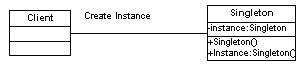
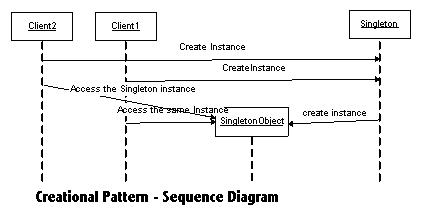
Singleton Pattern: In the Singleton Pattern we have at any given instance a single instance of the Singleton Class active. All instantiation of the Singleton Class references the same instance of the Class. The pattern also provides a global point of access to the sole instance of the class.

Class Diagram


Sequence Diagram

Implementation

Steps for implementing the Singleton Pattern:

Step1:
Create a project of type Console Application. Name it SingletonTest.

Step2:
Add a Class File named Singleton and add the following code
///
/// Summary description for Singleton.
///

public class Singleton
{
//Fields
private static Singleton instance;

///
/// Standard default Constructor
///

protected Singleton() {}

///
/// Static method for creating the single instance
/// of the Constructor
///

///
public static Singleton Instance()
{
// initialize if not already done
if( instance == null )
instance = new Singleton();

// return the initialized instance of the Singleton Class
return instance;
}
}

Step 3:
Create a Client class that would access the Singleton Class as follows :

///
/// Summary description for Client.
///

class Client
{
///
/// The main entry point for the application.
///

[STAThread]
static void Main(string[] args)
{
// Constructor is protected -- cannot use new
Singleton s1 = Singleton.Instance();
Singleton s2 = Singleton.Instance();
if( s1 == s2 )
Console.WriteLine( "The same instance" );
Console.ReadLine();
}
}

Step 4:
Run the Application it would display the following output:
Refer Output image


Conclusion

Thus we have implemented the Singleton Design Pattern using the .Net framework.Like any Concepts/Theory Singleton Pattern also has its pros and cons.

Benefits of Singleton Pattern:

1. Instance control: Singleton prevents other objects from instantiating their own copies of the Singleton object, ensuring that all objects access the single instance.

2. Flexibility: Because the class controls the instantiation process, the class has the flexibility to change the instantiation process.

Drawbacks of Singleton Pattern:

1. Overhead. Although the amount is minuscule, there is some overhead involved in checking whether an instance of the class already exists every time an object requests a reference. This problem can be overcome by using static initialization

2. Possible development confusion. When using a singleton object (especially one defined in a class library), developers must remember that they cannot use the new keyword to instantiate the object. Because application developers may not have access to the library source code, they may be surprised to find that they cannot instantiate this class directly.

3. Object lifetime. Singleton does not address the issue of deleting the single object. In languages that provide memory management (for example, languages based on the .NET Framework), only the Singleton class could cause the instance to be deallocated because it holds a private reference to the instance. In languages, such as C++, other classes could delete the object instance, but doing so would lead to a dangling reference inside the Singleton class.

Tuesday, October 31, 2006

Singleton Design Pattern

The Concept Design patterns are commonly defined as time-tested solutions to recurring design problems.

The most striking benefits of Design Patterns are as follows:

They provide you with a way to solve issues related to software development using a proven solution. The solution facilitates the development of highly cohesive modules with minimal coupling. They isolate the variability that may exist in the system requirements, making the overall system easier to understand and maintain.
Design patterns make communication between designers more efficient. Software professionals can immediately picture the high-level design in their thoughts immediately the name of the pattern used to solve a particular issue when discussing system design

Singleton Pattern: In the Singleton Pattern we have at any given instance a single instance of the Singleton Class active. All instantiation of the Singleton Class references the same instance of the Class. The pattern also provides a global point of access to the sole instance of the class.

Class Diagram


Sequence Diagram

Implementation

Steps for implementing the Singleton Pattern:

Step1: Create a project of type Console Application. Name it SingletonTest.

Step2:Add a Class File named Singleton and add the following code

///
/// Summary description for Singleton.
///

public class Singleton
{
//Fields
private static Singleton instance;
///
/// Standard default Constructor
///

protected Singleton() {}

///
/// Static method for creating the single instance
/// of the Constructor
///

///
public static Singleton Instance()
{
// initialize if not already done
if( instance == null )
instance = new Singleton();

// return the initialized instance of the Singleton Class
return instance;
}
}

Step 3:Create a Client class that would access the Singleton Class as follows :
///
/// Summary description for Client.
///

class Client
{
///
/// The main entry point for the application.
///

[STAThread]
static void Main(string[] args)
{
// Constructor is protected -- cannot use newSingleton s1 = Singleton.Instance();Singleton s2 = Singleton.Instance();if( s1 == s2 )Console.WriteLine( "The same instance" );Console.ReadLine();}}
Step 4:Run the Application it would display the following output:
ConclusionThus we have implemented the Singleton Design Pattern using the .Net framework.Like any Concepts/Theory Singleton Pattern also has its pros and cons. Benefits of Singleton Pattern:1. Instance control: Singleton prevents other objects from instantiating their own copies of the Singleton object, ensuring that all objects access the single instance.2. Flexibility: Because the class controls the instantiation process, the class has the flexibility to change the instantiation process.Drawbacks of Singleton Pattern:1. Overhead. Although the amount is minuscule, there is some overhead involved in checking whether an instance of the class already exists every time an object requests a reference. This problem can be overcome by using static initialization2. Possible development confusion. When using a singleton object (especially one defined in a class library), developers must remember that they cannot use the new keyword to instantiate the object. Because application developers may not have access to the library source code, they may be surprised to find that they cannot instantiate this class directly.3. Object lifetime. Singleton does not address the issue of deleting the single object. In languages that provide memory management (for example, languages based on the .NET Framework), only the Singleton class could cause the instance to be deallocated because it holds a private reference to the instance. In languages, such as C++, other classes could delete the object instance, but doing so would lead to a dangling reference inside the Singleton class.

Monday, April 18, 2005

What is so sharp about C#?

I was going through a list of articles available on the INETA website. I came across an article with the heading “Why C # is sharp and why is VB.NET basic?” Hmmm… However, the author has no intentions of looking down upon VB. I have done quite a few projects in VB 6. I am still a VB enthusiast because what I like most about it, is its simplicity and ability to do amazing stuff with little effort (directly proportional to coding?? Ahem…).

A few days back, I had read an extensive comparison between 11 languages in the September 2004 edition of DIQ (Developer IQ http://www.developeriq.com). It was called “The Great Language Shootout”. The article tabulates the results with C# scoring an overall 68pts and Java landing at 65pts. The article also explains in detail about the evaluation process. These figures are clearly just indicators of a test process and cannot form the basis to decide the power and application of any language or its future.

Unable to resist the temptation, I decided to write a simple HelloWorld… nope not just World… HelloManagedWorld program in C#. Managed because, I’m using the .NET csc compiler.

The code:

using System;
class helloManagedWorld
{
static void Main()
{
Console.WriteLine("Hello Managed World!");
}
}

Some explanation:

The using System; directive references a namespace called System that is provided by the Microsoft .NET Framework class library. This namespace contains the Console class referred to in the Main method. Namespaces provide a hierarchical means of organizing the elements of one or more programs. A “using” directive enables unqualified use of the types that are members of the namespace. The “Hello Managed World!” program uses Console.WriteLine as shorthand for System.Console.WriteLine.

The Main method is a member of the class helloManagedWorld. It has the static modifier, and so it is a method on the class helloManagedWorld rather than on instances of this class.

The entry point for an application—the method that is called to begin execution—is always a static method named Main.

How to compile the geeky way (ie. if you only have the .NET Framework, without VS.NET):
I started off with some errors as usual... case sensitivity and some syntax problems…

C:\WINNT\Microsoft.NET\Framework\v1.0.3705>csc helloWorld.cs
Microsoft (R) Visual C# .NET Compiler version 7.00.9466
for Microsoft (R) .NET Framework version 1.0.3705
Copyright (C) Microsoft Corporation 2001. All rights reserved.

helloWorld.cs(4,30): error CS1552: Array type specifier, [], must appear before
parameter name

C:\WINNT\Microsoft.NET\Framework\v1.0.3705>csc helloWorld.cs
Microsoft (R) Visual C# .NET Compiler version 7.00.9466
for Microsoft (R) .NET Framework version 1.0.3705
Copyright (C) Microsoft Corporation 2001. All rights reserved.

error CS5001: Program 'helloWorld.exe' does not have an entry point defined

C:\WINNT\Microsoft.NET\Framework\v1.0.3705>csc helloWorld.cs
Microsoft (R) Visual C# .NET Compiler version 7.00.9466
for Microsoft (R) .NET Framework version 1.0.3705
Copyright (C) Microsoft Corporation 2001. All rights reserved.

C:\WINNT\Microsoft.NET\Framework\v1.0.3705>helloWorld
Hello World!

Wasn’t that simple enough? So this is just the beginning. Lets see where I go from here. :-)

Types in C#

First time I saw the C# code in a magazine, I thought, Another new language, new syntax, new keywords…more confusion”. But now I don’t think so. C# is not completely different from other languages speaking of its syntax and approach. Moving further on, I learnt about the data types in C#.

C# supports two kinds of types: value types and reference types. No big deal. The name says it all. In case of values types, the variable stores the value directly and in case of reference types, it stores the reference to the variable (address). Other concepts like possibility of two variables referencing the same object are possible as in the case of C++.

A sample program to understand the types:

using System;
class ClassObj
{
public int num = 0;
}

class ClassTest
{
static void Main()
{
int x = 0;
int y = x;
y = 101;

ClassObj ref1 = new ClassObj();
ClassObj ref2 = ref1;
ref2.num = 999;

Console.WriteLine("Values: {0}, {1}", x, y);
Console.WriteLine("Refs: {0}, {1}", ref1.num, ref2.num);
}
}

C:\WINNT\Microsoft.NET\Framework\v1.0.3705>csc D:\cstypes.cs
Microsoft (R) Visual C# .NET Compiler version 7.00.9466
for Microsoft (R) .NET Framework version 1.0.3705
Copyright (C) Microsoft Corporation 2001. All rights reserved.

C:\WINNT\Microsoft.NET\Framework\v1.0.3705>cstypes
Values: 0, 101
Refs: 999, 999

An interesting thing that I’ve observed is the method used to print the formatted output in Console.WriteLine

Console.WriteLine takes a variable number of arguments. The first argument is a string, which may contain numbered placeholders like {0} and {1}. Each placeholder refers to a trailing argument with {0} referring to the second argument, {1} referring to the third argument, and so on. Before the output is sent to the console, each placeholder is replaced with the formatted value of its corresponding argument.

Simple Basic Concept in C#

It is always better to understand these concepts with an example rather than trying to understand paragraphs of explanation.

Example:
class sharpTest
{
static void Main()
{
string s = "Sunil";
string t = string.Copy(s);
Console.WriteLine(s == t);
Console.WriteLine((object)s == (object)t);
}
}

Output:
True
False

Inference:
Two expressions of type object are considered equal if both refer to the same object, or if both are null.
Two expressions of type string are considered equal if the string instances have identical lengths and identical characters in each character position, or if both are null.

Type conversions are similar to C++. Implicit conversions like int to long are done without any loss of data. Explicit conversions are done with a cast expression.

Arrays in C#
As usual, single-dimensional and multi-dimensional arrays are supported.

// Creates a single-dimensional array of 5 elements
int[] arr = new int[5];

What is to be noted is that arrays are also reference types and hence have to be explicitly allocate the memory by specifying the size of the array.

// Some more arrays
int[,,] a3; // 3-dimensional array of int
int[][] j2; // "jagged" array: array of (array of int)
int[][][] j3; // array of (array of (array of int))


Type system unification
class Test
{
static void Main() {
Console.WriteLine(3.ToString());
}
}
All types including value types are derived from the type object. It is possible to call object methods on any value, even values of “primitive” types such as int.

Tuesday, April 05, 2005

C# versus VB.NET

Hi

many of our friends wanna know about this question, so i would like to answer this questions

Q: any advantages C# would have over Visual Basic (VB) in terms of the framework?
Answer: Regarding C# vs. Visual Basic, it really primarily comes down to what you already know and are comfortable with. It used to be that there was a large perf difference between VB and C++, but since C# and VB.NET use the same execution engine, you really should expect the same perf. C# may have a few more "power" features (such as unsafe code), and VB.NET may be skewed a bit more towards ease of use (e.g. late bound methods calls), but the differences are very small compared to what they were in the past.

Q: Okay, can we contrast C# with VB.NET? Questions usually come in the form of "I know you guys say VB.NET and C# let you do the same thing, but C# was designed for the CLR, so I don't believe you when you say VB.NET is just as good."

Answer: Regarding C# versus VB.NET, the reality is that programmers typically have experience with either C++ or VB, and that makes either C# or VB.NET a natural choice for them. The already existing experience of a programmer far outweighs the small differences between the two languages.


Q: Could you discuss the security of the config files. I have seen a lot of concern that since they are simple XML files, they can be hacked into easily.

Answer: We do block all access to the config files from remote users. However, I think the concern people have is whether a rogue user who gets access to the config file can modify and take over things. Note that this problem exists with ASP today as well, in that the metabase APIs can be written to, which would effectively do the same thing. However, there are some things that you can do to reduce this problem. Specifically, with ASP.NET we support the ability to "lock down" settings at a parent directory. For example, you might want to lock down the security identity of the worker process (i.e.: the username it runs under) at the machine level and then restrict sub-applications' abilities to override it.


Q: I've seen a lot of concern that data can be passed page to page (ASP to and from ASP.NET).

Answer: Since we really use standard Web techniques, passing info page to page should not be a problem. However, page to page in ASP and ASP.NET typically assumes services that are provided by each, such as session and application state. These services are not shared, and so you can't rely on them. I have a list of things you can do to ease migration of ASP code to ASP.NET.
1. Use only a single language within the ASP application. Don't intermix VBScript and JScript together in the same page (in general a bad programming practice with ASP, but also a migration issue for ASP.NET in that we now require only one inline <% %> language.
2. Explicitly declare all of ASP page functions within a